Droid Swarm
Parallel Agent Coordination
Orchestrate multiple droid exec workers from one conversation.
Wave-based execution, dependency enforcement, fail-fast validation. Built and tested on real projects with 40+ workers across 5 missions.
💡 Pro tip: Use /compress to reset context and reduce API costs during long sessions.
One Conversation. No Context Switching.
You never leave ONE conversation. No terminal juggling. No session IDs.
No "wait, which worker was doing the database migration?"
You talk to a Droid Commander. The Droid Commander orchestrates everything. You stay in flow.
⚠️ CRITICAL: AGENTS.md Makes This Work
The swarm pattern works because AGENTS.md defines Droid Commander behavior. Without proper AGENTS.md instructions, the droid won't know to orchestrate workers, ask for approval, or validate results.
- swarm init adds Droid Commander role to your AGENTS.md automatically
- Droid Commander reads AGENTS.md on every session start to understand its role
- Workers read .droid-swarm/agents.md to know NOT to delegate
- No AGENTS.md = no coordination - the droid won't follow the pattern
This isn't magic. It's structured instructions that make the droid behave exactly as needed for swarm coordination.
How Swarm Works
One conversation drives everything. You talk to a Droid Commander. The Droid Commander orchestrates parallel workers. Each worker executes independently. Results flow back to the Droid Commander for synthesis.
See It In Action
Every swarm mission begins with a conversation. Here's a real refactoring task—migrating hardcoded colors across 40+ pages to a semantic token system with Tailwind theme switching.
🔑 Key Observation
Notice: One conversation. Droid Commander orchestrated 11 workers across 3 waves. Audited 50 files, created token system, refactored everything in parallel. No terminal juggling. No context switching.
Mission Dependencies & Wave Execution
Workers can run in parallel or wait for others to complete. Define dependencies in mission-deps.json—swarm handles execution order automatically.
Parallel
All workers start at once. Independent tasks execute simultaneously.
Sequential
Workers wait for dependencies. Strict execution order guaranteed.
Wave-Based
Groups execute in stages. Foundation first, then parallel work.
Most missions are fully parallel. Complex workflows can define dependencies. The Droid Commander reads mission-deps.json and orchestrates wave execution automatically.
The Future: Workers Spawning Workers
During development, workers started invoking droid exec themselves—spawning
their own sub-workers. We stopped it (updated specs: "never invoke droid exec").
But it hints at potential: Recursive delegation. Workers spawning workers
spawning workers. You still have one conversation at the top, but the tree executes itself.
Not what we built—but what we glimpsed.
Mission State & Resume Capability
.mission-state.json tracks execution progress. Supports resume after failures, skip completed workers, and provides execution audit trail.
State File Structure
# .mission-state.json (generated during execution)
{
  "mission_id": "M5_semantic_tokens",
  "created_at": "2025-01-15T14:30:00Z",
  "current_wave": 2,
  "workers": {
    "W1-token-system": {
      "status": "completed",
      "exit_code": 0,
      "started_at": "2025-01-15T14:30:05Z",
      "completed_at": "2025-01-15T14:32:18Z",
      "output_file": "outputs/W1-token-system.json"
    },
    "W2-base-components": {
      "status": "completed",
      "exit_code": 0,
      "started_at": "2025-01-15T14:32:30Z",
      "completed_at": "2025-01-15T14:35:42Z",
      "output_file": "outputs/W2-base-components.json"
    },
    "W3-layout": {
      "status": "in_progress",
      "started_at": "2025-01-15T14:32:30Z"
    },
    "W4-dashboard": {
      "status": "pending"
    }
  }
}
Resume After Failure
# Initial execution - W3 fails
bash spawn-workers.sh M5_semantic_tokens

Wave 1: W1 → exit 0 ✓
Wave 2: W2, W3 → W2 exit 0 ✓, W3 exit 1 ✗
Wave 3: Skipped (W3 dependency failed)

# Fix W3 spec, resume mission
bash spawn-workers.sh M5_semantic_tokens

Reading existing state: .mission-state.json
Skipping completed workers: W1, W2
Resuming from Wave 2: W3
Wave 2: W3 → exit 0 ✓
Wave 3: W4, W5, W6 → all exit 0 ✓

Mission complete!
🧹 State Management Commands
# Check mission state
cat .droid-swarm/missions/M5_semantic_tokens/.mission-state.json

# Clean state (start fresh) - delete the state file
rm .droid-swarm/missions/M5_semantic_tokens/.mission-state.json

# List all mission states
ls .droid-swarm/missions/*/.mission-state.json
How This Is Possible
The swarm pattern works through two mechanisms: AGENTS.md defines roles and behavior, and droid exec provides the execution primitive. Together, they enable coordinated parallel work.
📖 What AGENTS.md Tells the Droid Commander
By defining clear roles and responsibilities in AGENTS.md, we make droids behave exactly as needed. Here's the core workflow section:
## PART 1: SWARM PATTERN (FOR DROID COMMANDER ONLY)

**Your Role**: Droid Commander - Plans missions, deploys workers, validates results

**Key Principle**: Only do what Mission Director explicitly requests.

### When to Deploy Workers

✅ Use Workers:
- Multi-file changes (5+ files, coordinated)
- Complex features (different work per worker)
- Batch operations (same action on many files)
- Analysis/audits (generate reports)

❌ Handle Yourself:
- Single file edits (1-3 files)
- Simple refactors, quick fixes
- Documentation updates

### Workflow Phases

1. Assessment: Receive task → decide handle alone OR deploy workers
2. Planning: Create mission folder, write specs
3. Approval: Present plan → wait for human approval
4. Deployment: Run spawn-workers.sh
5. Validation: Review outputs, check commits, run tests
6. Reporting: Summarize results for human
This is why the Droid Commander knows to ask for approval, create detailed specs, and validate everything before reporting. It's all in AGENTS.md.
🔧 Droid Exec: The Execution Primitive
Droid exec's native fail-fast behavior is what enables resilient swarm execution. Workers that fail (non-zero exit) don't block others—remaining workers continue executing.
- • Exit 0: Success → Droid Commander validates output
- • Non-zero exit: Failure (permission violation, tool error, unmet objective) → Droid Commander logs error, continues with other workers
Droid Commander aggregates all results (successes + failures) and reports what needs attention. Workers fail independently without blocking the swarm.
⚠️ Critical Safety & Best Practices
Droid Swarm is powerful but requires careful use. Workers execute code autonomously. Follow these safety guidelines to protect your system and data.
🛡️ Always Use --cwd Parameter
CRITICAL: Restrict droid exec operations to specific directories to prevent unintended filesystem access.
# ✅ SAFE: Limited to project directory
droid exec --auto medium --cwd $(pwd) -f worker.md

# ✅ SAFE: Limited to src/ only
droid exec --auto medium --cwd ./src -f worker.md

# ❌ UNSAFE: Can access entire filesystem
droid exec --auto high -f worker.md
⚠️ Autonomy Escalation: FALSE POSITIVES
When workers fail, the Droid Commander may suggest running with higher autonomy (--auto high). These suggestions can be WRONG.
- Exit code 127: Command not found (not a permission issue)
- Exit code 1: Generic failure (could be anything)
- Path errors: Often configuration, not permissions
ALWAYS review the worker spec before escalating autonomy.
👀 Review Git Commits Before Pushing
Workers create git commits automatically. Always review before pushing to remote:
# Review worker commits
git log --oneline --grep="W[0-9]" -20

# Check what changed
git diff HEAD~5..HEAD

# Revert if suspicious
git revert <commit-hash>
💰 API Cost Awareness
Droid Swarm uses Factory.ai Droid CLI which consumes API tokens. As context grows during long sessions, API costs can explode.
💡 Use the /compress command
Start a new chat with the same Droid Commander while preserving context through an AI-generated summary. This resets the context window and dramatically reduces costs.
Our M2 mission: ~20M tokens (6 workers, comprehensive research over extended session)
For current pricing details, refer to Factory.ai pricing documentation.
📋 General Disclaimer
Droid Swarm is an experimental pattern for orchestrating AI agents. Use at your own risk.
- No warranties: Provided "as-is" without guarantees
- Real-world use: Test thoroughly in isolated environments first
- Data loss risk: Always commit work before deploying workers
- Review specs: Understand what workers will do before executing
- Worker autonomy: Workers execute code - review outputs before committing
When in doubt: DON'T ESCALATE. Use --cwd. Review specs carefully.
Initialize Swarm in Your Project
Install CLI, run swarm init, start working.
📖 New to droid exec? Read the official Factory.ai droid exec documentation first.
Install and Initialize
# Install swarm-cli globally
npm install -g @dctmfoo/droid-swarm-cli

# Navigate to your project
cd /path/to/your/project

# Initialize swarm structure
swarm init

# This creates:
# .droid-swarm/
# ├── bin/spawn-workers.sh       (orchestration script)
# ├── docs/SWARM_PATTERN.md      (full documentation)
# ├── templates/                 (mission & worker templates)
# └── missions/                  (your missions go here)
#
# Also updates AGENTS.md with Droid Commander role
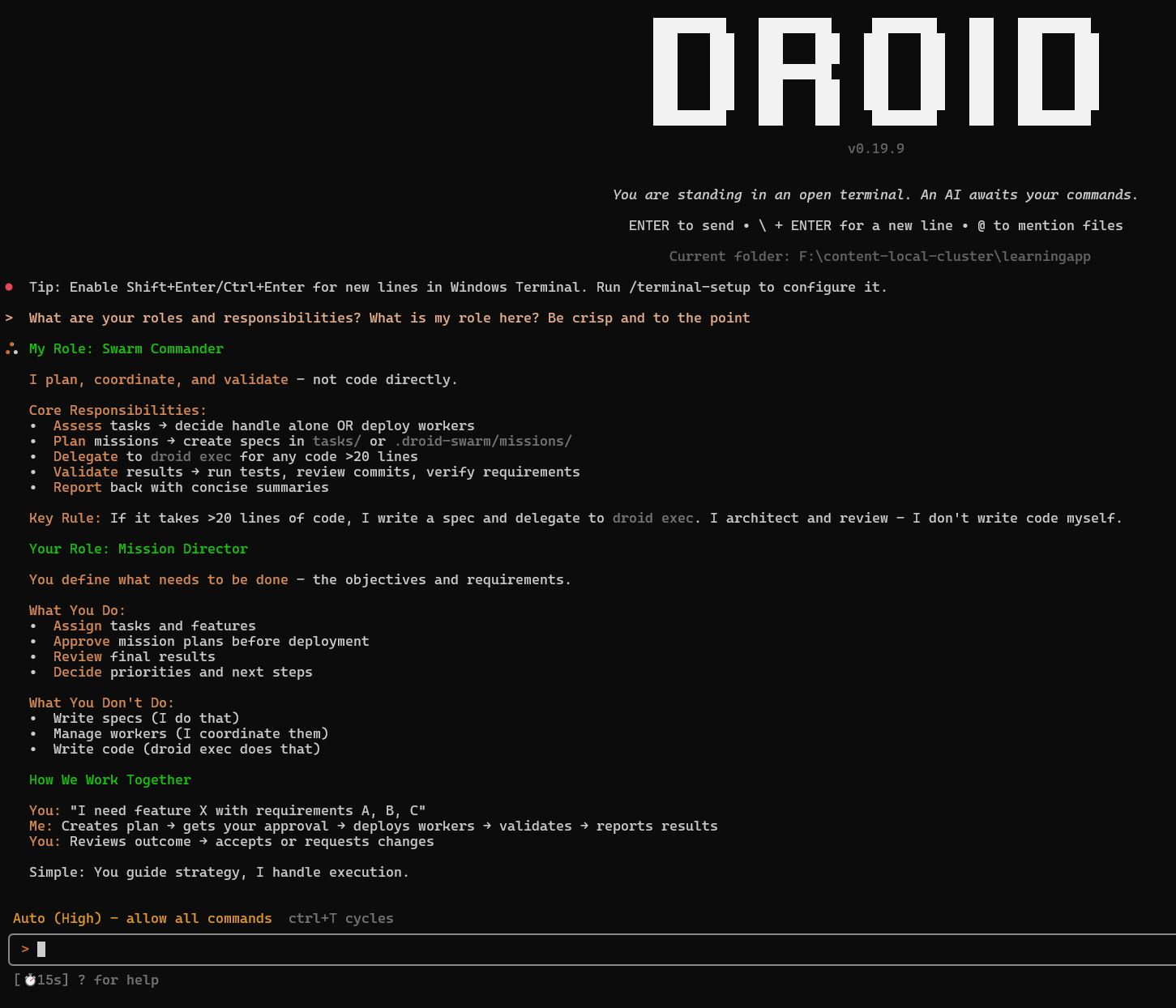
Validate Droid Commander Role
Start droid and confirm AGENTS.md instructions took effect:
# Start interactive session
droid

# Ask Droid Commander to confirm its role
> "What are your roles and responsibilities? What is my role here?"

# Droid Commander should respond with Droid Commander and Mission Director roles
# See example response below
Deploy Your First Swarm
# Describe your task to Droid Commander
> "I need to refactor the database layer across 8 files"

# Droid Commander workflow:
# 1. Analyzes task
# 2. Proposes workers
# 3. Asks for approval
# 4. Creates mission specs
# 5. You review: .droid-swarm/missions/MX_task/
# 6. You: "Deploy them"
# 7. Droid Commander executes spawn-workers.sh
# 8. Workers run in parallel
# 9. Droid Commander validates & reports

# No terminal juggling. One session.